How Do I Perform a Two Sample t-Test in Excel Using
SigmaXL?
Two Sample t-Test with Assumptions test
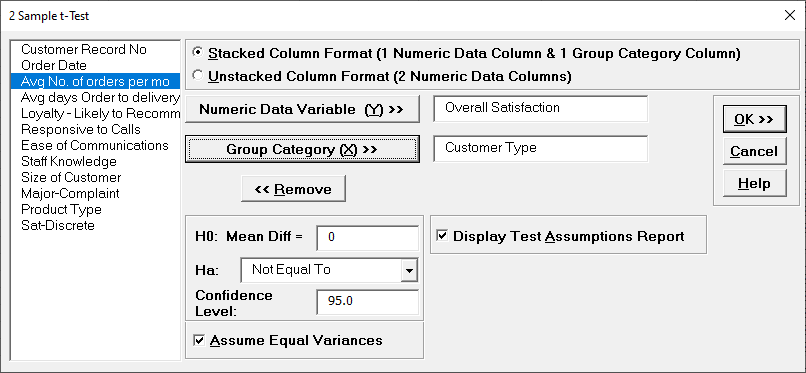
Open Customer Data.xlsx, click Sheet 1 tab. We will look at comparing means of Customer Satisfaction by Customer Type ( 2 vs. 3), using the Two Sample t-test. H0: μ2=μ3, Ha: μ2≠μ3
Click SigmaXL > Statistical Tools > 2 Sample t-test. If necessary, check
Use Entire Data Table, click Next.
With stacked column format checked, select
Overall Satisfaction, click Numeric Data Variable Y >>; select
Customer Type, click Group Category X >>;
H0: Mean Diff = 0; Ha:Not Equal To;
Confidence Level: 95%; ensure that Assume Equal Variances and
Display Test Assumption Report are checked:
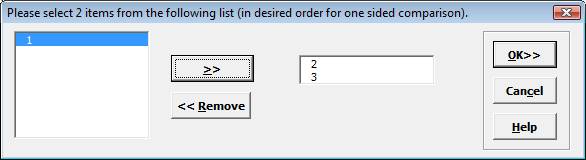
Click OK. Select Customer Type 2 and
3.
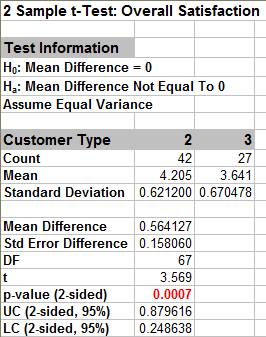
Click OK. Resulting output:
Given the p-value of .0007 we reject H0 and conclude that Mean Customer Satisfaction is significantly different between Customer type 2 and 3. This confirms previous findings.
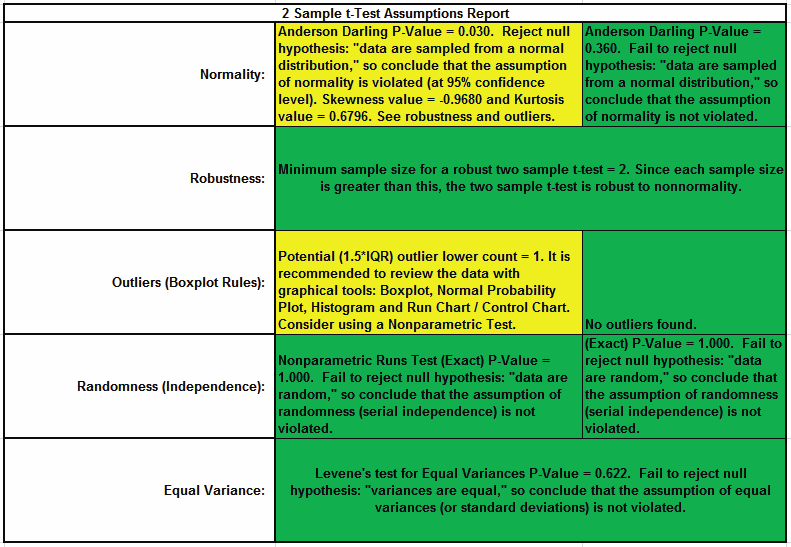
2 Sample t-Test Assumptions Report:
This is a text report with color highlight: Green (OK), Yellow
(Warning) and Red (Serious Violation). Each sample is tested for Normality using the Anderson Darling test.
If not normal, the minimum sample size for robustness of the 2
sample t-Test is determined utilizing Monte Carlo regression
equations (see Basic Statistical Templates – Minimum Sample Size for
Robust t-Tests and ANOVA). If the sample size is inadequate, a
warning is given and the Nonparametric Mann-Whitney Test is
recommended.
Each sample is tested for Outliers defined as: Potential: Tukey's
Boxplot (> Q3 + 1.5*IQR or < Q1 – 1.5*IQR); Likely: Tukey's Boxplot
2*IQR; Extreme: Tukey's Boxplot 3*IQR. If outliers are present, a
warning is given and recommendation to review the data with a
Boxplot and Normal Probability Plot. Here we have a potential
outlier for Customer Type 2.
Tip: If the removal of outlier(s) result in an
Anderson Darling P-Value that is > 0.1, a notice is given that
excluding the outlier(s), the sample data are inherently normal.
Each sample is tested for Randomness using the Exact Nonparametric
Runs Test. If the sample data is not random, a warning is given and
recommendation to review the data with a Run Chart.
A test for Equal Variances is also applied. If all sample data are
normal, the F-Test is utilized, otherwise Levene’s Test is used. If
the variances are unequal and the test being used is the equal
variance option, then a warning is given and Welch’s test is
recommended.
Define, Measure, Analyze, Improve, Control
Simulate, Optimize, Realize
Web Demos
Our CTO and Co-Founder, John Noguera, regularly hosts free Web Demos featuring SigmaXL and DiscoverSim Click here to view some now!