- LIVE HELP IS

How Do I Standardize Data in Excel Using SigmaXL?
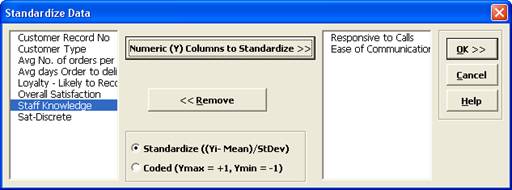
This tool is used to Standardize ((Yi – Mean)/StDev) or Code (Ymax = +1, Ymin = -1) your data. This is particularly useful when performing Multiple Regression. Standardized Predictors have better statistical properties. For example, the importance of model coefficients can be determined by the relative size because units are removed. Another statistical benefit is reduced multicollinearity when investigating two-factor interactions.- Click Sheet 1 Tab of Customer Data.xlsx.
- Click SigmaXL > Data Manipulation > Standardize Data.
- Ensure that the entire data table is selected. If not, check
Use Entire Data Table. Click
Next.
- Select Responsive to Calls and Ease of Communications and click Numeric (Y) Columns to Standardize >>.
- Click OK. The results are given on the Standardize sheet:

Define, Measure, Analyze, Improve, Control



Simulate, Optimize,
Realize

Web Demos
Our CTO and Co-Founder, John Noguera, regularly hosts free Web Demos featuring SigmaXL and DiscoverSim
Click here to view some now!
Contact Us
Phone: 1.888.SigmaXL (744.6295)
Support: Support@SigmaXL.com
Sales: Sales@SigmaXL.com
Information: Information@SigmaXL.com


