How Do I Calculate Power and Sample Size for a Two Proportions Test?
To calculate power and sample size for a two proportions test in SigmaXL, use the Power & Sample Size Calculator or Power & Sample Size with Worksheet.
Click SigmaXL > Statistical Tools > Power &
Sample Size Calculators > 2 Proportions Test Calculator.
Select Solve For Power (1−Beta). Enter
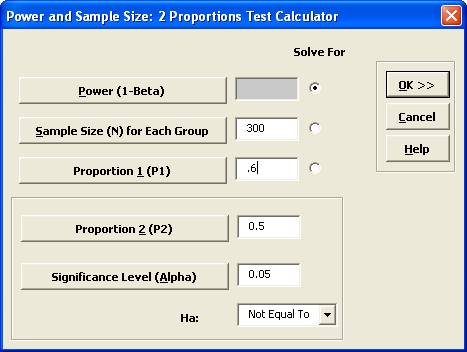
Sample Size and Proportion 1 values as shown:
Note that we are calculating the power or likelihood of detection given that P1 = 0.5 and P2 = 0.6, sample size for each group = 300, significance level = .05, and Ha: Not Equal To (two-sided test).
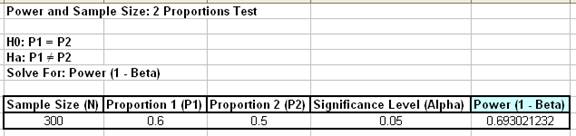
Click OK. The resulting report is displayed:
A power value of 0.69 is unacceptable. Note that this
value is much less than the power for the one proportion test (0.94).
To compensate, we will double the sample size per group. Press
F3 or click Recall SigmaXL Dialog to recall last
dialog. Change the sample size per group from 300 to 600. Note that the power value is
now 0.94.
To determine Power & Sample Size using a Worksheet, click
SigmaXL > Statistical Tools > Power & Sample Size with Worksheet >
2 Proportions Test.
A graph showing the relationship between Power, Sample Size and
Proportion Values can then be created using
SigmaXL > Statistical Tools > Power & Sample Size Chart. See
1 Sample t-Test power and sample size example.