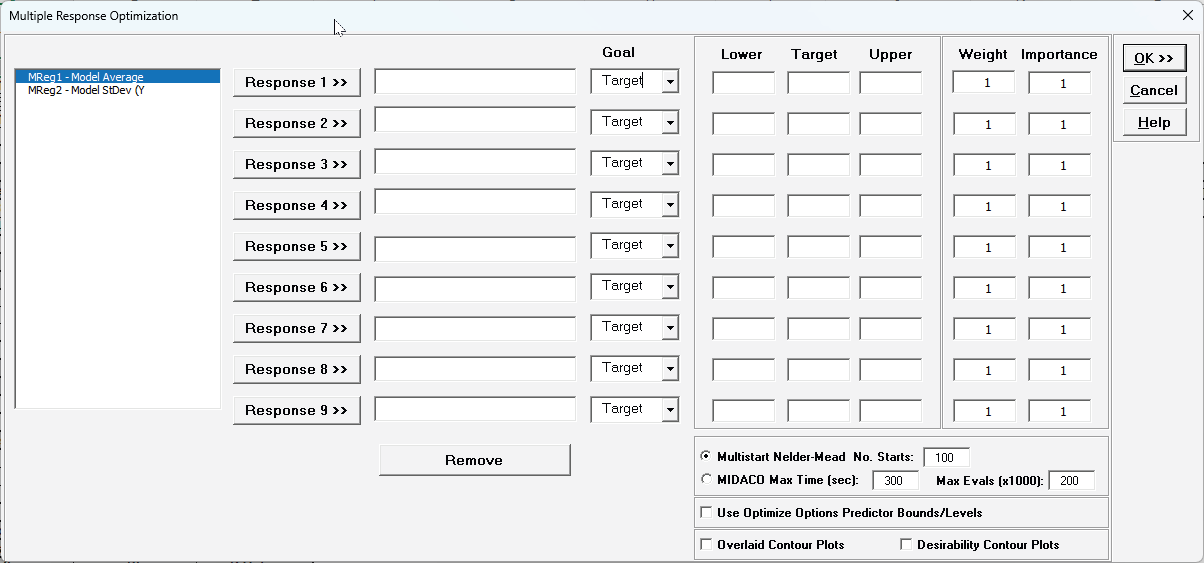
Select Responses to use in MRO from the available models in the workbook that have been created using Advanced Multiple Regression.
If the response Goal is Target, a Target value must be specified. It must be a value greater than Lower and less than Upper.
If the response Goal is Maximize or Minimize, Target is not used.
Lower and Upper limits must always be specified. They can be specification limits or practical limits for maximization/minimization. For maximization, a practical upper limit would be a value beyond which an increase in desirability is not beneficial. For minimization, a practical lower limit is a value below which an increase in desirability is not beneficial. The initial values for Lower and Upper that are given in the dialog are the minimum and maximum response values respectively.
Importance allows for weighting of the responses according to relative importance. Use a value between 0.1 and 10 (default = 1).
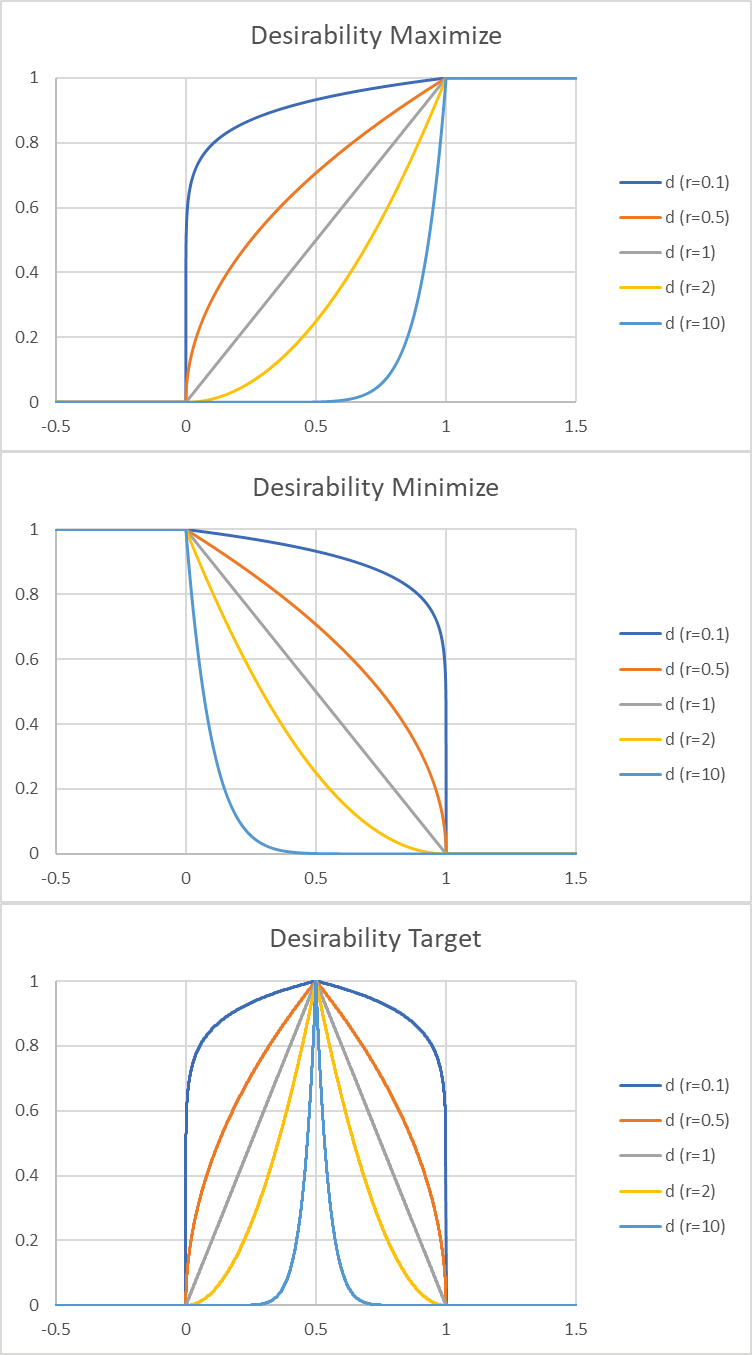
Weight (r) is a shape factor. For weight = 1 (default), the desirability function increases linearly. For weight ⟨ 1, the function is concave, so low priority on hitting the target or goal. For weight > 1, the function is convex, so high priority on hitting the target or goal. Use a value between 0.1 and 10.
Multistart Nelder-Mead: Nelder-Mead Simplex is derivative free so can accommodate the non-smooth desirability response with both continuous and categorical predictors. It is very fast but gives a local solution. Multistart helps to improve the chances of finding a global solution. If there are a number of equally valid best solutions, the one with the smallest predicted response standard error is chosen.
MIDACO: Mixed Integer Distributed Ant Colony Optimization (MIDACO) is a global optimizer so would be more suitable for a complex problem with multiple local solutions, but is slower than Nelder-Mead. The MIDACO settings of Max. Time (sec), Maximum Time (seconds) and Max Evals (x1000), Maximum Function Evaluations with no Change (x1000), may be modified. The default settings are 300 seconds and 200,000 function evaluations, but 600 seconds and 1,000,000 evaluations may be needed for a complex problem with a large number of continuous and categorical factors.
Use Optimize Options Predictor Bounds/Levels: For each specified response model sheet that is used in MRO, continuous predictors can optionally be constrained to a range or specified as integers and categorical predictors can be held to a specified level. If this option is checked, MRO will apply these constraints. If there is a conflict in the constraints across models for a given continuous predictor, the lower bound used in MRO is the maximum of the lower bounds and upper bound is the minimum of the upper bounds. If any of the models flag a continuous predictor as an integer, then it is assumed to be integer continuous for MRO. For categorical levels, if they are inconsistent across models, then MRO will use all levels. In order to constrain MRO to use a specific categorical level, all models must have that same level specified.
Overlaid Contour Plots: 2 to 5 Continuous Factors with an Overlaid Plot created for every pairwise combination and other continuous/categorical factors held fixed at optimal values. The contour lines are the response upper and lower bounds, with the feasible region that satisfies all bounds unshaded and the optimal point shown as a red dot.
Desirability Contour Plots: 2 to 5 Continuous Factors with a Desirability Contour/Surface plot created for every pairwise combination and other continuous/categorical factors held fixed at optimal values. The contour lines are composite desirability values. This is used to assess solution robustness, ideally looking for a flat response close to the optimal value.