Interaction Plots in SigmaXL
The Interaction Plots demonstrated in the Two-Way ANOVA
example are also available as a standalone graphical tool.
- Open Customer Data.xlsx, click on sheet 1 tab (or press
F4 to activate last worksheet).
- Click SigmaXL > Graphical Tools > Interaction Plot. Ensure that
the entire data table is selected.
If not, check Use Entire Data Table.
- Click Next.
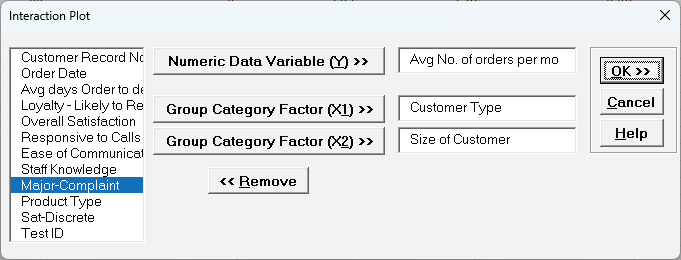
Select Avg No of Orders per Mo, Click Numeric Data Variable (Y)
>>; select Customer Type, click Group Category
Factor (X1) >>; select Size of Customer, click Group
Category Factor (X2) >>.
- Click OK.
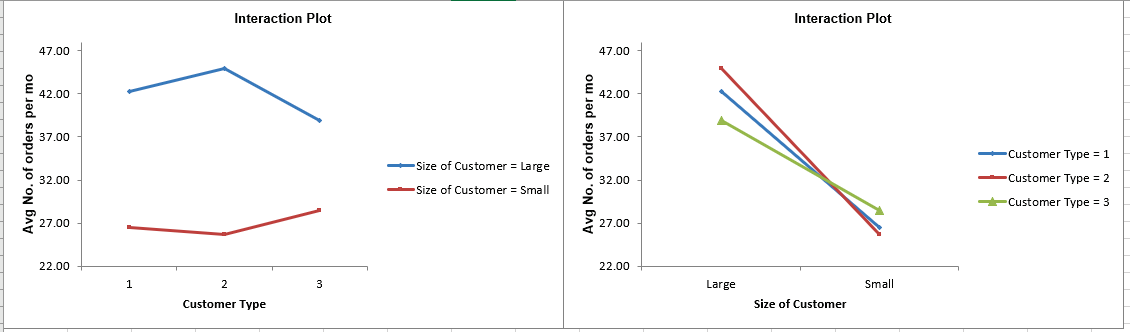
The mean values shown are fitted means from a Two-Way ANOVA, not data means.