Advanced Design of Experiments: Augment with Optimal/Center Points
Dialog
SigmaXL > Design of Experiments > Advanced Design of Experiments: Augment with
Optimal/Center Points > Augment Design
Augment Type: Optimal
-
Augment any Advanced DOE type: 2-Level Factorial/Screening, General Full Factorial,
Definitive Screening, Response Surface, or Optimal. The user specifies the desired
optimality criterion and model. The optimal design is then determined by adding new runs
to the existing experimental design.Fraction of Design Space (FDS) Plots, Optimal Design
Diagnostic Metrics, Model Term SE, VIF and Power are available. See Example 8: Advanced
2-Level Factorial/Screening Design with Augment Optimal – Cake Bake.
-
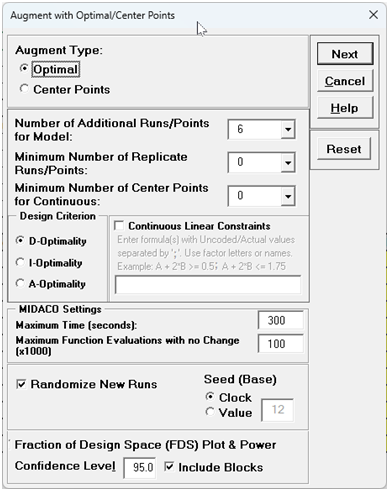
The Number of Additional Runs/Points for Model specify the number of runs in
addition to the minimum required by the model (i.e., number of coefficient terms
including constant). The default value is 6. If 0 is specified (with Minimum Number
of Replicate Runs/Points = 0and Minimum Number of Center Points for
Continuous = 0), the error df will be 0; the recommended minimum additional runs
is 3.
-
If Minimum Number of Replicate Runs/Points > 0or Minimum Number of Center
Points for Continuous> 0, a constraint is added to the objective function to
ensure that these requirements are met. Note that if Minimum Number of Center Points
for Continuous> 0 and there are categorical factors, the categorical factor
levels will not necessarily be balanced.
-
Select Design Criterion: D-Optimality to specify a D-Optimal design that
maximizes the determinant of the X'X information matrix, which minimizes the volume of
the joint confidence region of the estimated regression coefficients. This results in
good overall model precision, so is recommended as a general purpose alternative to
screening and two-level factorial designs.
-
Select Design Criterion: I-Optimality to specify an I-Optimal design that
minimizes the trace of (X′X)-1 M, where M is the moment matrix for the given model.
This minimizes the average prediction variance (integrated variance) over the design
space, which can be thought of as minimizing the area under the Fraction of Design Space
(FDS) Plot. Since the primary objective of a Response Surface design is accurate
prediction and optimization, I-Optimality is recommended for RSM designs.
-
Select Design Criterion: A-Optimality to specify an A-Optimal design that
minimizes the trace of (X′X)-1, which minimizes the average variance of the estimated
regression coefficient terms and is recommended for screening designs.
-
Check Continuous Linear Constraints to specify constraints and enter formula(s)
with uncoded/actual values, separated by a semicolon ‘;’. Use factor letters (A to T,
excluding I) as a shorthand notation or factor names. Example: A + 2*B >= 0.5; A + 2*B
<= 1.75. If factor letters are used, the constraint formula will be displayed using the
factor names.
-
Constraint formulas apply only to continuous factors and must be linear. Use comparison
operators ‘>=’ or ‘<=’ to define constraints. The formula must be on the left-hand side
and the numeric value on the right-hand side. Illegal constraint formulas are error
trapped. Note, factor levels can be any continuous value within the constraint
region.
-
Note that for analysis, constraint formulas will automatically be applied to Optimize
and Multiple Response Optimization, but not to Contour and Surface Plots.
-
Tip: SigmaXL does not directly support Mixture designs, but they can be created
using a
Slack Variable model, where one of the mixture variables is removed from the design
model and the constraint formula. For example, the mixture constraint A + B + C = 1 with
Low = 0 and High = 1 for each factor and factor A designated as the slack variable,
would be written as:
o B + C >= 1 - A(High)
o B + C <= 1 - A(Low)
With the final constraint formulas specified as:
o B + C>=
0; B +
C <= 1
Additional constraints may be specified. Note, the analysis of the mixture
design must also exclude the slack variable.
-
The MIDACO settings of Maximum Time (seconds) and Maximum Function Evaluations
with no Change (x1000) may be modified. The default settings are 300 seconds and
100,000 function evaluations, but 600 seconds and 1,000,000 evaluations may be needed
for a complex problem with more than 30 terms, multi-level categorical terms or
constraints.
-
Randomize Runs– check to randomize runs with Seed (Base) as either
Clock or specified Value. The latter will randomize the runs but always in
the same random order for the same seed value. If unchecked, runs are given in standard
order.
-
Fraction of Design Space (FDS) Plot and Power - the FDS Plot and Power use the
same model as specified for the Optimal design. Unchecking Include Blocks will
remove Blocks from the model for the FDS Plots and Power, but note that the Optimal
Design Diagnostic Metrics will still be displayed with Blocks, as that is what
was used in the design optimization. (If Optimal Design Diagnostic Metrics without
Blocks are desired, this can be done using Evaluate Design). For details on FDS
Plots, see the Appendix: Fraction of Design Space (FDS) Plots. See also Example 6: Evaluating
Response Surface Designs with the Fraction of Design Space (FDS) Plot.
Confidence Level is used in the Margin of Error (Interval Half-Width) Plot and to
specify the Significance Level (Alpha) for Power. For details on the power calculations,
see the Appendix: Power Analysis for Advanced Design of Experiments.
-
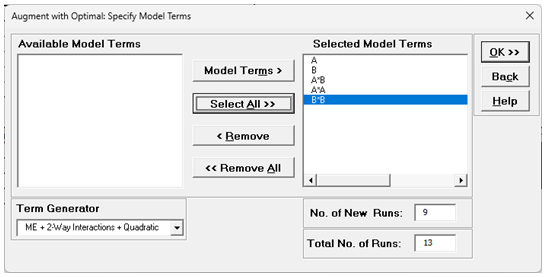
After specifying a model, the No. of New Runs and Total No. of Runs are
given. Total No. of Runs = Number of runs required by the model + Number of
Additional Runs/Points for Model + Minimum Number of Replicate Runs/Points + Minimum
Number of Center Points for Continuous.
Advanced Design of Experiments: Augment with Optimal/Center Points Dialog
SigmaXL > Design of Experiments > Advanced Design of Experiments: Augment with Optimal/Center
Points > Augment Design
Augment Type: Center Points
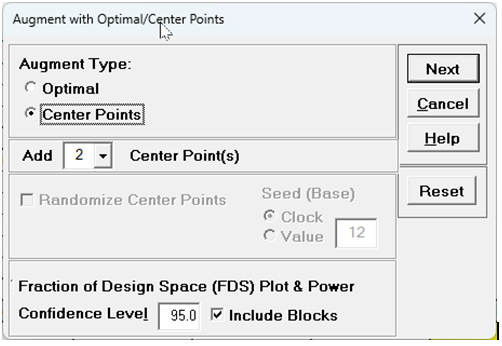
For the Augment with Center Points option, the user specifies the number of center points to add. If there are categorical factors, the center points are pseudo center points, and the number of center points will be multiplied by the number of categorical combinations. The option to Randomize only appears if there are categorical factors.