Utilities — Interpolate Missing Values
The Interpolate Missing Values utility is used automatically in Exponential Smoothing when
there are missing values. While there is robustness against some missing values, if the
number of missing values is large, then model estimation and forecast accuracy will be
degraded.
- Open Monthly Airline Passengers Missing
Values.xlsx (Sheet 1 tab). Ln(Airline
Passengers2) has missing values at observations 50 and 100.
- Click
SigmaXL > Time Series Forecasting > Utilities > Interpolate Missing
Values. Ensure that the entire data table is selected. If not, Use
Entire Data Table. Click Next.
-
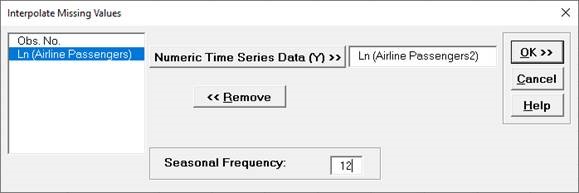
Select Ln(Airline Passengers2), then click
Numeric Time Series Data (Y) >>. Seasonal
Frequency is specified as 12.
- Click OK. A new sheet
is created with the seasonally adjusted, linearly interpolated
values highlighted in yellow.
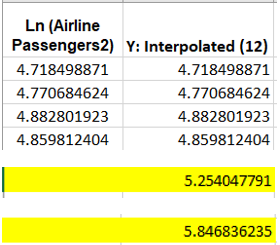
Y50 is estimated as 5.254 (versus original value of 5.278). Y100
is estimated as 5.847 (versus original value of 5.852).