An important assumption for process capability analysis is that the data be normally distributed.
The Capability Combination Report (Individuals Nonnormal) allows you to transform the data to normality or utilize nonnormal distributions, including:
Box-Cox Transformation (includes an automatic threshold option so that data with negative values can be transformed)
Note that these transformations and distributions are particularly effective for inherently skewed data but should not be used with bimodal data or where the nonnormality is due to outliers (typically identified with a Normal Probability Plot).
In these cases, you should identify the reason for the bimodality or outliers and take corrective action.
Another common reason for nonnormal data is poor measurement discrimination leading to “chunky” data.
In this case, attempts should be made to improve the measurement system.
SigmaXL’s default setting is to use the Box-Cox transformation which is the most common approach to dealing with nonnormal data.
Box-Cox is used to convert nonnormal data to normal by applying a power transformation, Y^lambda, where lambda varies from -5 to +5.
You may select rounded or optimal lambda. Rounded is typically preferred since it will result in a more “intuitive” transformation such as Ln(Y) (lambda=0) or SQRT(Y) (lambda=0.5).
If the data includes zero or negative values, select Lambda & Threshold.
SigmaXL will solve for an optimal threshold which is a shift factor on the data so that all of the values are positive.
Open the file Nonnormal Cycle Time2.xlsx. This contains continuous data of process cycle times. The Critical Customer Requirement is: USL = 1000 minutes.
Let’s begin with a view of the data using Histograms and Descriptive Statistics. Click
SigmaXL > Graphical Tools > Histograms & Descriptive Statistics.
Ensure that entire data table is selected. If not, check
Use Entire Data Table. Click Next.
Select Cycle Time (Minutes), click
Numeric Data Variable (Y) >>. Click OK.
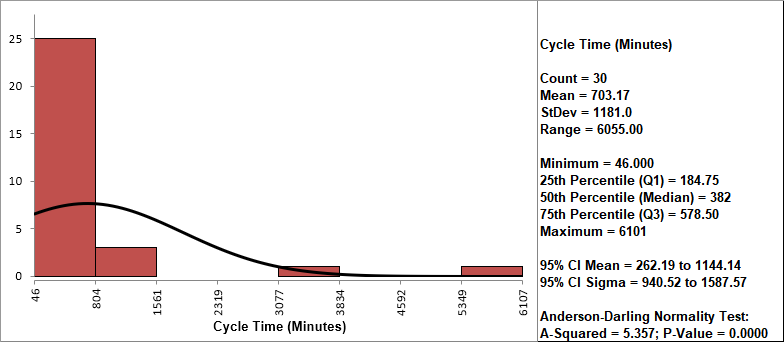
Clearly this is a process in need of improvement. To
start, we would like to get a baseline process capability. The
problem with using regular Capability analysis is that the results
will be incorrect due to the nonnormality in the data. The Histogram
and AD p-value < .05 clearly show that this data is not normal.
We will confirm the nonnormality by using a Normal Probability Plot. Click
Sheet 1 Tab (or F4). Click
SigmaXL > Graphical Tools > Normal Probability Plots.
Ensure that the entire data table is selected. If not, check
Use Entire Data Table. Click Next.
Select Cycle Time (Minutes), click
Numeric Data Variable (Y) >>. Click OK.
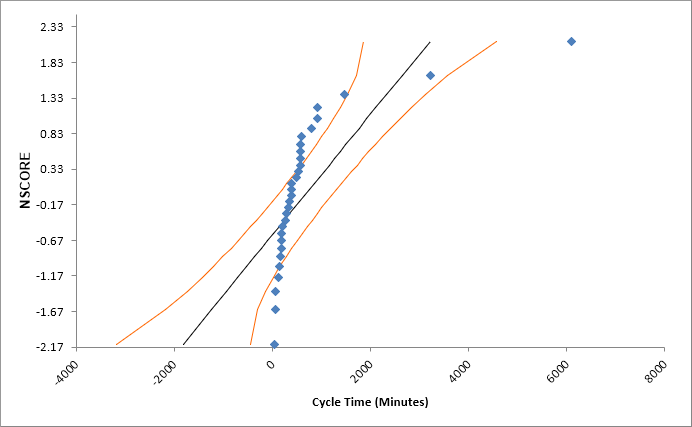
A Normal Probability Plot of Cycle Time data is produced:
The curvature in this normal probability plot confirms that this data is not normal.
For now, let us ignore the nonnormal issue and perform a
Process Capability study assuming a normal distribution. Click
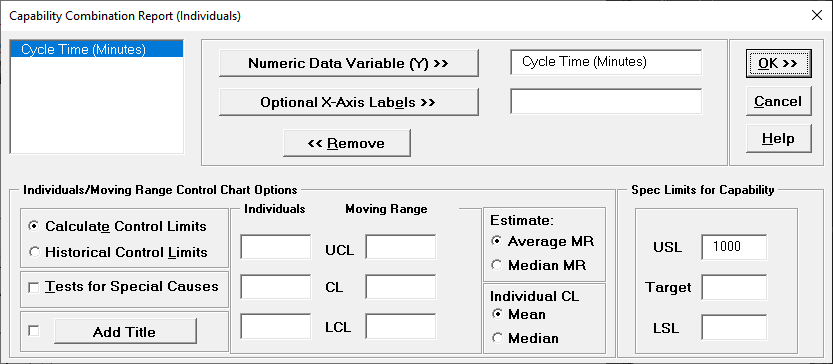
Sheet 1 Tab. Click SigmaXL > Process Capability > Capability
Combination Report (Individuals).
Select Cycle Time (Minutes), click
Numeric Data Variable (Y) >>. Enter
USL = 1000; delete previous
Target and LSL settings.
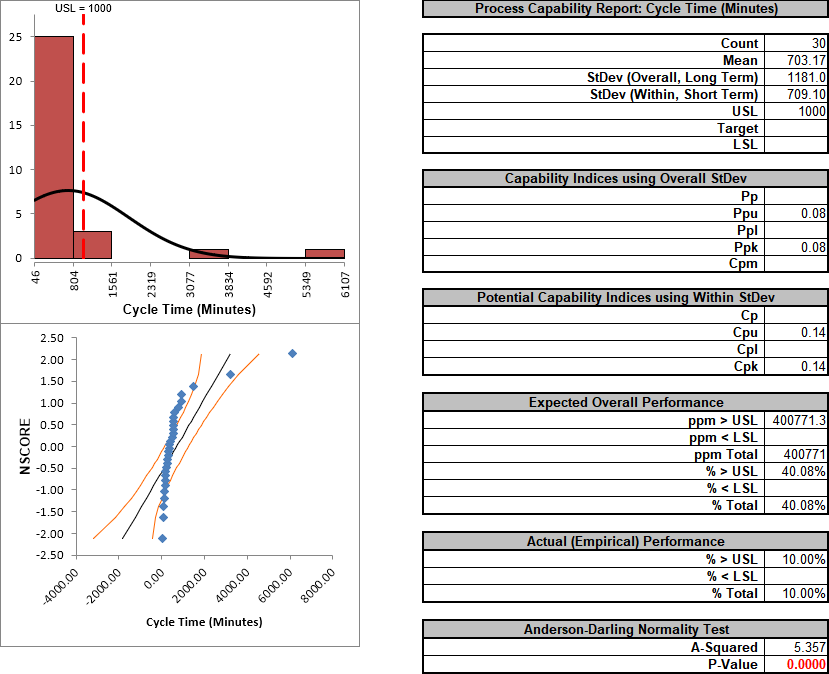
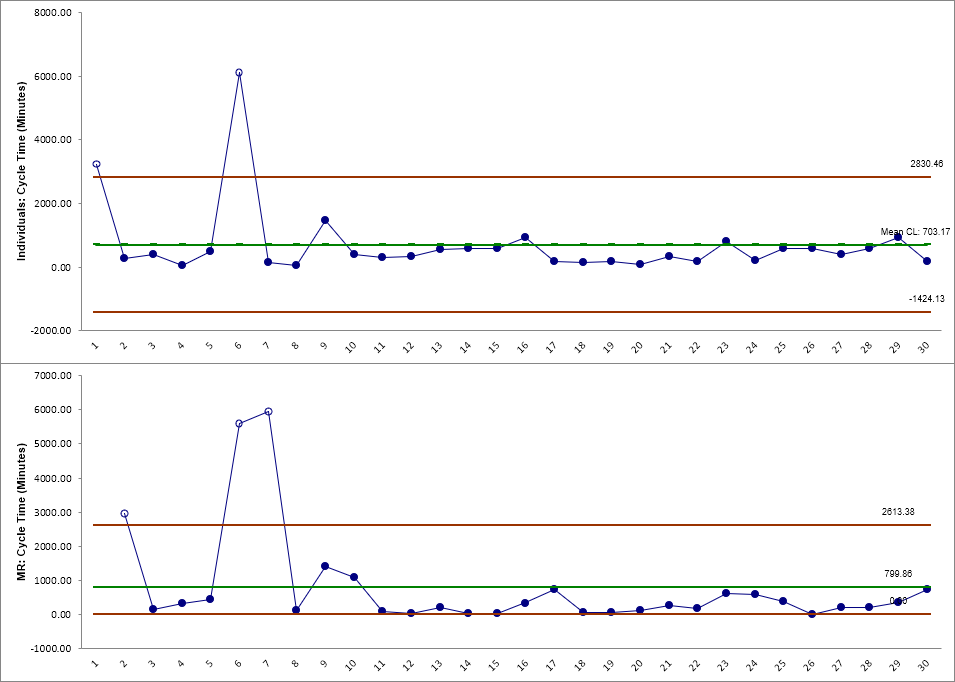
Click OK. The resulting Process Capability Report is shown below:
Notice the discrepancy between the Expected Overall (Theoretical) Performance and Actual (Empirical) Performance.
This is largely due to the nonnormality in the data, since the expected performance assumes that the data is normal.
So why not just use the actual performance and disregard the expected?
This would not be reliable because the sample size, n = 30, is too small to estimate performance using pass/fail (discrete) criteria.
Also note that the process appears to be out-of-control on both the individuals and moving range charts.
We will now perform a process capability analysis using the Capability Combination Report for Nonnormal Individuals. Click
Sheet 1 Tab (or F4). Click
SigmaXL > Process Capability > Nonnormal > Capability Combination Report (Individuals Nonnormal). Ensure that the entire data table is selected. If not, check
Use Entire Data Table. Click Next.
Select Cycle Time (Minutes), click
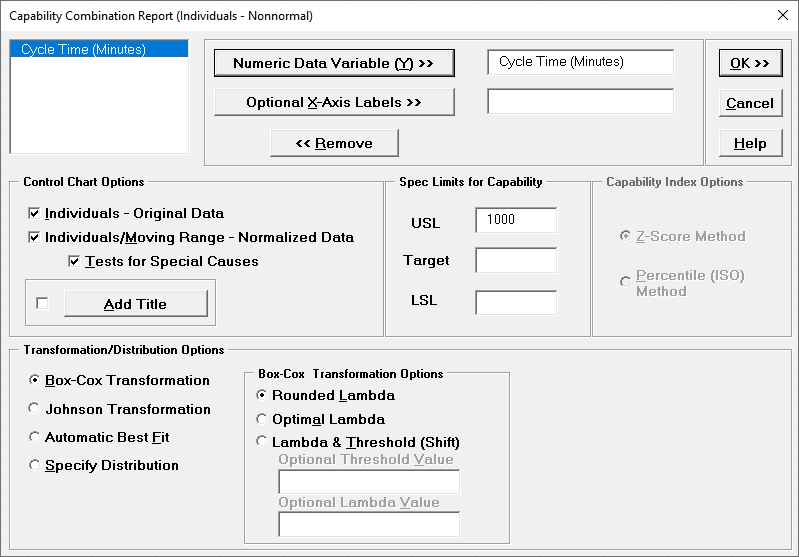
Numeric Data Variable (Y) >>. Enter USL = 1000. We will use the default selection for
Transformation/Distribution Options: Box-Cox Transformation with
Rounded Lambda. Check Tests for Special Causes as shown:
Click OK.
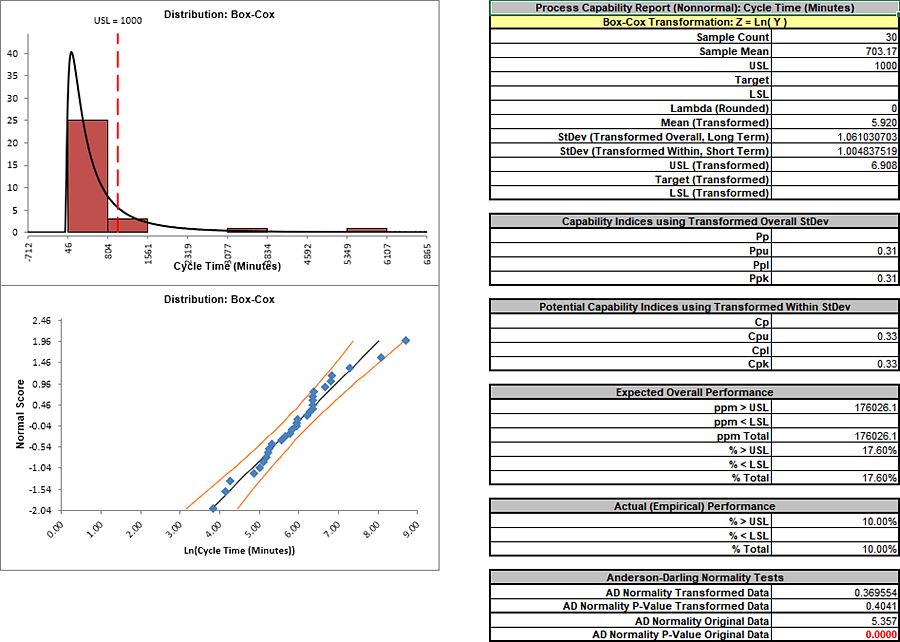
The resulting Process Capability Combination report is shown below:
The AD Normality P-Value Transformed
Data value of 0.404 confirms that the Box-Cox
transformation to normality was successful. The process capability
indices and expected performance can now be used to establish a
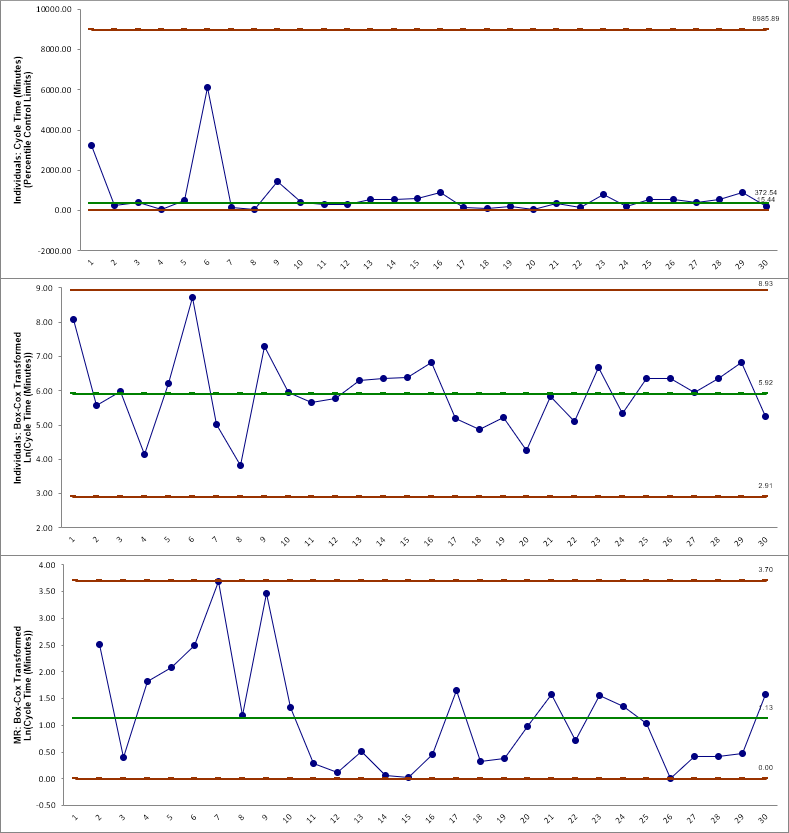
baseline performance. Note that there are no out-of-control signals
on the control charts, so the signals observed earlier when
normality was assumed were false alarms.
The Individuals – Original Data chart displays the
untransformed data with control limits calculated as:
UCL = 99.865 percentile
CL = 50th percentile
LCL = 0.135 percentileThe benefit of displaying this chart is that one can observe the
original untransformed data. Since the control limits are based on
percentiles, this represents the overall, long term variation rather
than the typical short term variation. The limits will likely be
nonsymmetrical.
The Individuals/Moving Range – Normalized Data
chart displays the transformed z-values with control limits
calculated using the standard Shewhart formulas for Individuals and
Moving Range charts. The benefit of using this chart is that tests
for special causes can be applied and the control limits are based
on short term variation. The disadvantage is that one is observing
transformed data on the chart rather than the original data.
Automatic Best Fit
Now we will redo the capability analysis using the Automatic Best Fit option.
Click Recall SigmaXL Dialog menu or press
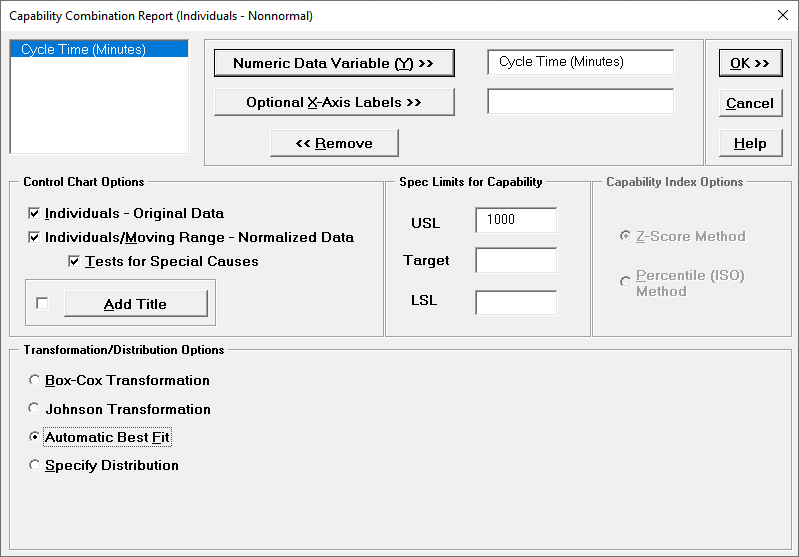
F3 to recall last dialog. Select Automatic Best Fit as shown:
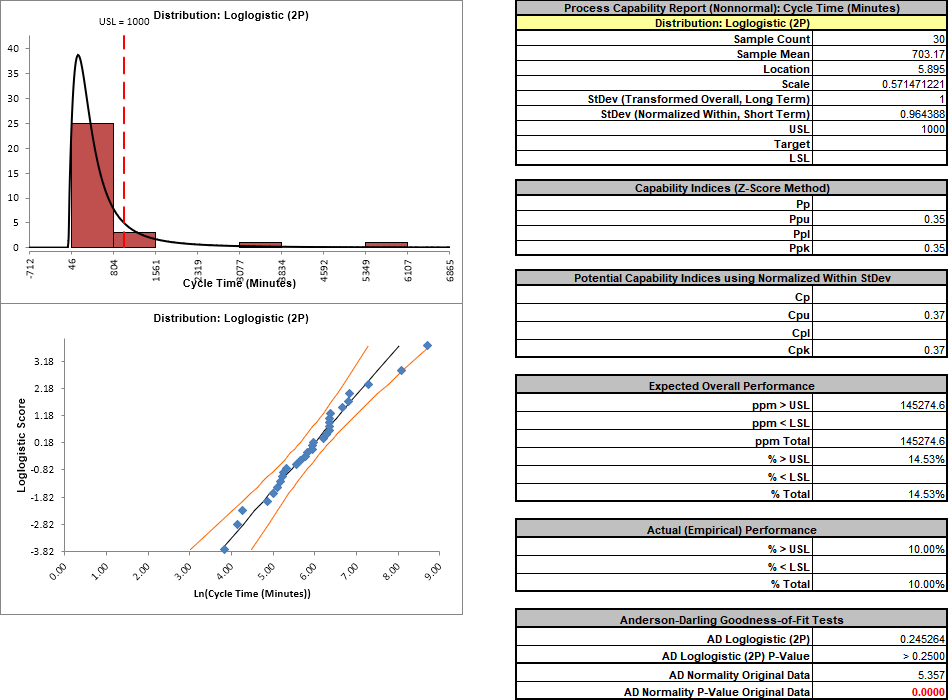
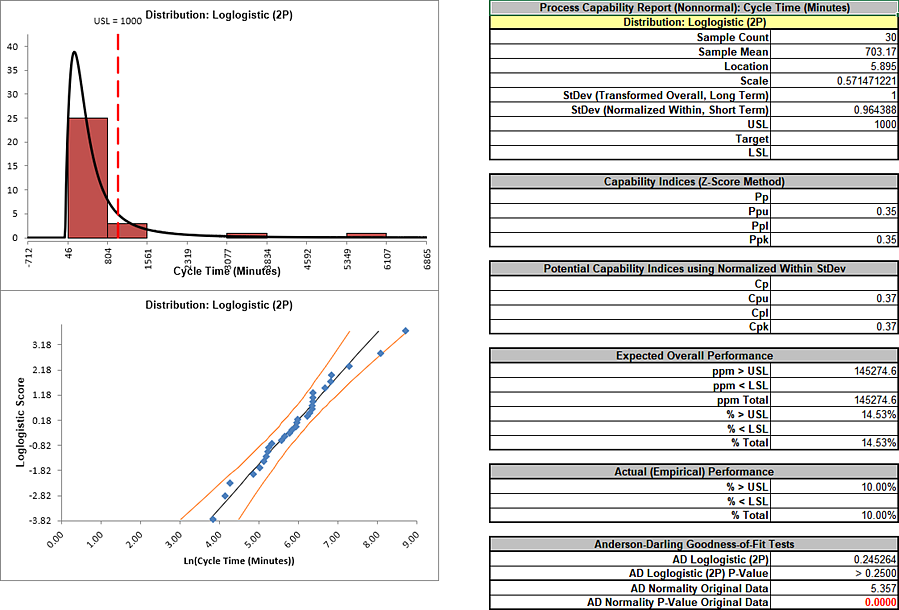
Click OK. The resulting Process Capability Combination report is shown below.
Please note that due to the extensive computations required, this could take up to 1 minute (or longer for large datasets):
The Anderson Darling statistic for the Loglogistic distribution is
0.245 which is less than the 0.37 value for the AD Normality test of
the Box-Cox transformation indicating a better fit. (Note that
published AD p-values for this distribution are limited to a maximum
value of 0.25. The best fit selection uses a p-value estimate that
is obtained by transforming the data to normality and then using a
modified Anderson Darling Normality test on the transformed data).
Another helpful tool to evaluate transformations and distributions
is Distribution Fitting.
Click Sheet 1 Tab (or
F4). Click SigmaXL > Process Capability > Nonnormal > Distribution Fitting. Ensure that the entire data table is selected. If not, check
Use Entire Data Table. Click Next.
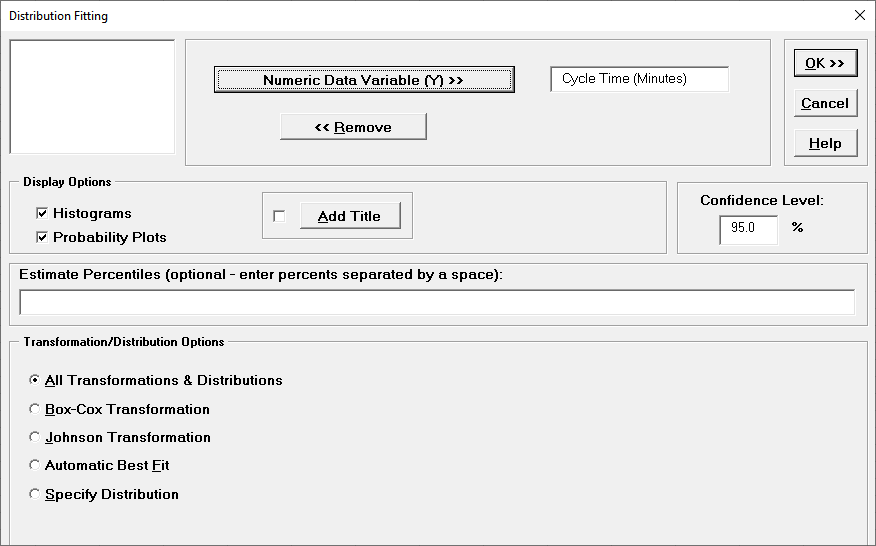
Select Cycle Time (Minutes), click Numeric
Data Variable (Y) >>. We will use the default selection
for Transformation/Distribution Options: All
Transformations & Distributions as shown:
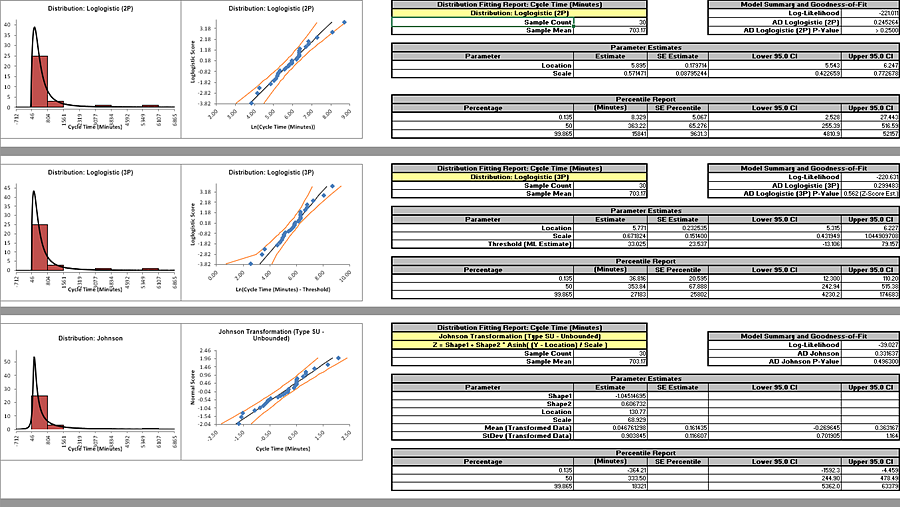
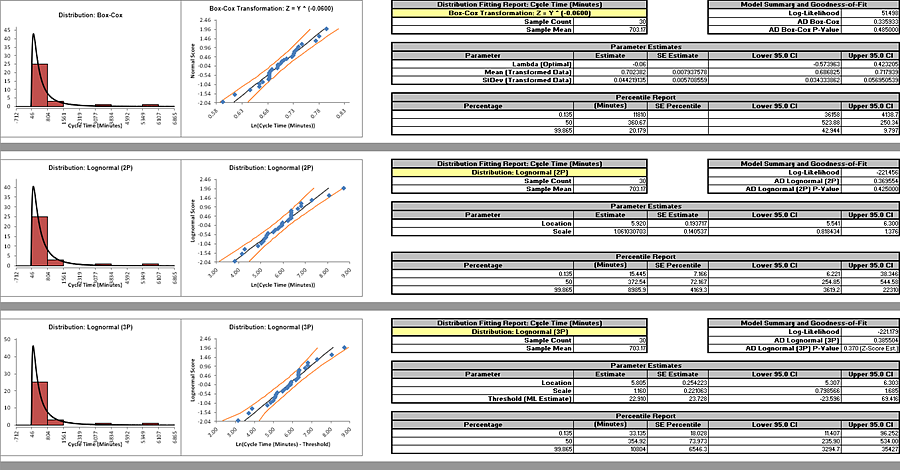
Click OK. The resulting Distribution Fitting report is shown below. Please note that due to the extensive computations required, this could take up to 1 minute (or longer
for large datasets):
The distributions and transformations are sorted in descending
order using the AD Normality p-value on the transformed z-score
values. Note that the first distribution shown may not be the
selected “best fit”, because the best fit procedure also looks
for models that are close but with fewer parameters.
The reported AD p-values are those derived from the particular
distribution. The AD p-value is not available for distributions
with a threshold (except Weibull), so the AD Normality p-value
on the transformed z-score values is used (labeled as Z-Score
Est.).
Since the sort order is based on the AD p-values from Z-Score
estimates, it is possible that the reported distribution based
AD p-values may not be in perfect descending order. However any
discrepancies based on sort order will likely not be
statistically or practically significant.
Some data will have distributions and transformations where the
parameters cannot be solved (e.g., 2-parameter Weibull with
negative values). These are excluded from the Distribution
Fitting report.
The parameter estimates and percentile report includes a
confidence interval as specified in the Distribution Fitting
dialog, with 95% being the default. Note that the wide intervals
here are due to the small sample size, n = 30.
The control limits for the percentile based Individuals chart
will be the 0.135% (lower control limit), 50% (center line,
median) and 99.865% (upper control limit). Additional
percentiles may be entered in the Distribution Fitting dialog.
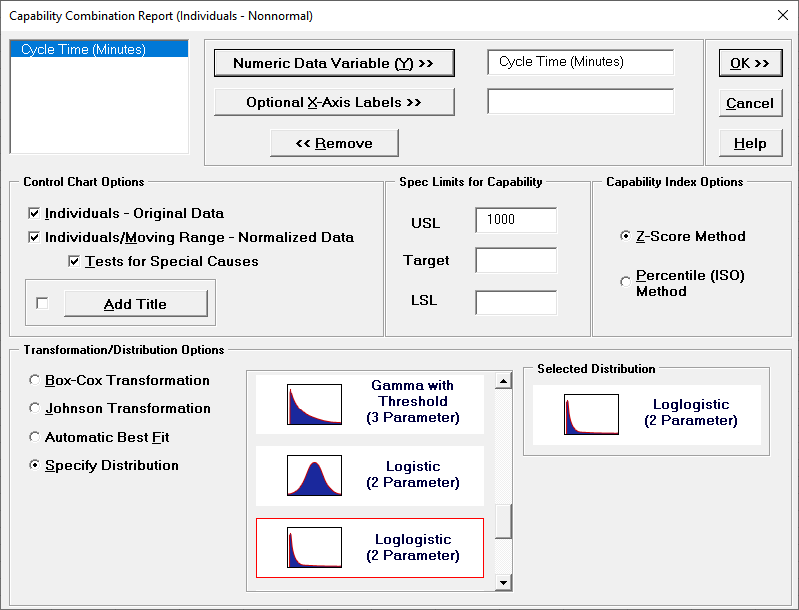
After reviewing this report, if you wish to perform a process
capability analysis with a particular transformation or
distribution, simply select Specify Distribution from the
Transformation/Distribution Options in the
Capability
Combination Report (Individuals - Nonnormal) dialog as shown
below (using 2 Parameter Loglogistic):
Define, Measure, Analyze, Improve, Control
Simulate, Optimize, Realize
Web Demos
Our CTO and Co-Founder, John Noguera, regularly hosts free Web Demos featuring SigmaXL and DiscoverSim Click here to view some now!